
Vimeo × uQualio
Your Vimeo video library, turned into courses that actually teach
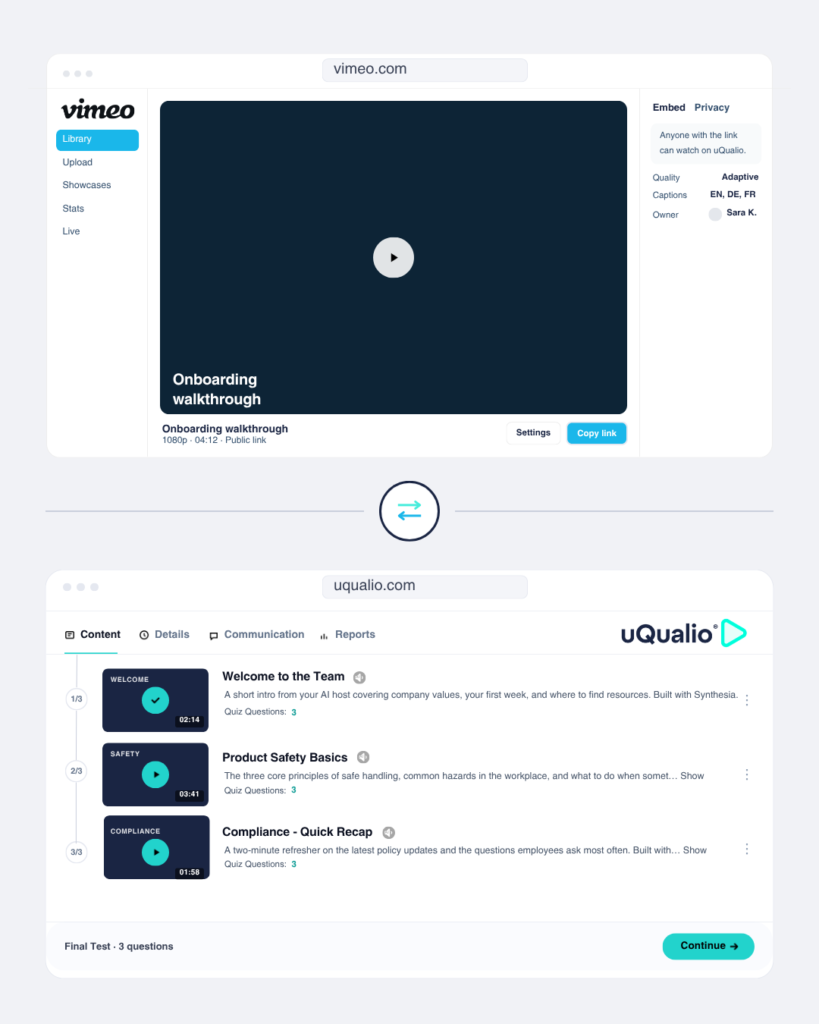
You already have the videos. Connect Vimeo to uQualio and turn your existing recordings, webinars, and expert content into structured, trackable training courses — ad-free, private, and professional. No re-uploading. No starting from scratch.
Connecting two powerful platforms

X

How it works
From Vimeo video library to deployed training course in three steps
The Vimeo – uQualio integration takes the video content you’ve already produced and gives it a learning structure your organization can actually measure.
Step 01
Your content lives in Vimeo
Vimeo is where your best video content lives – recorded webinars, expert interviews, product demos, onboarding footage, and more.
High quality, ad-free, and private. It’s your professional video library, waiting to be used.
Step 02
Link your Vimeo videos in uQualio
No download, no re-upload. Paste your Vimeo video URL directly into uQualio. Your video plays natively inside the course, branded, ad-free, and crystal clear.
Use uQualio’s scene selector to break longer recordings into bite-sized microlearning chapters that learners can navigate and review.
Step 03
Add quizzes, track completions, issue certificates
Layer uQualio’s quiz engine, feedback tools, and completion tracking on top of your Vimeo content.
Know exactly who has watched, who has passed, and who needs a nudge – across your entire organization.
videos to re-upload
video quality supported
ad-free playback
existing videos you can activate
The integration advantage
Stop letting your best video content sit unused in a library
Most organizations have years of valuable video content in Vimeo. Recorded training sessions, leadership talks, product walkthroughs, compliance briefings, that never makes it into a structured learning program. This integration changes that. Paste a link and your Vimeo video becomes a course chapter, complete with quizzes and completion tracking, in minutes.
- Link any Vimeo video directly into uQualio – no downloading or re-uploading required
- Use uQualio’s scene selector to break long recordings into focused, bite-sized learning chapters
- Add interactive quizzes, knowledge checks, and learner feedback on top of any Vimeo video
- Track who has watched, who passed, and who needs a follow-up – in real time
- Issue completion certificates automatically when learners pass a course
Why it matters
The video LMS that makes your Vimeo library worth so much more
Vimeo gives you the world’s best professional video hosting.
uQualio turns that hosted content into learning that’s structured, trackable, and provably effective.
Use cases
What teams are building with the Vimeo + LMS integration
Employee Training
Webinar recordings turned into evergreen training courses
You ran a brilliant compliance briefing or product training webinar. Three months later, new hires can’t access it.
Connect Vimeo to uQualio and that recording becomes a permanent, trackable course – with a quiz at the end to confirm understanding. Run it once, train forever.
content reuse from existing Vimeo recordings
Onboarding
Expert content made accessible to every new hire
Your most knowledgeable people are on Vimeo – expert talks, leadership messages, technical walkthroughs.
Structure them into an onboarding course in uQualio and every new hire gets the same high-quality introduction to your organization, on their schedule, tracked from day one.
reduction in onboarding coordination time
Customer Education
Turn product demos into certified customer training
Link your Vimeo product walkthroughs and how-to videos into a uQualio customer training program. Add knowledge checks at the end of each video, issue a completion certificate, and give your customers structured, self-paced learning that reduces support tickets and drives product adoption.
increase in product feature adoption after video-based training
Get started
Ready to turn your Vimeo library into training courses that scale?
Connect Vimeo to uQualio’s video microlearning LMS in minutes. Your content is already there — now give it a structure, a quiz, and a certificate. Free no-risk trial.
Quick Answers to Common Questions!
- What is Vimeo?
Vimeo is the world’s leading professional video hosting platform — built for creators, businesses, and L&D teams who need reliable, high-quality, ad-free video. Unlike consumer platforms, Vimeo gives you full control over your content: custom branded players, domain-level privacy, password protection, 4K streaming, and detailed viewer analytics. It’s used by organizations worldwide to host training content, webinars, product demos, and expert video libraries securely and professionally.
- Why use the Vimeo LMS integration with uQualio?
Because your Vimeo library is more valuable than a video archive. By connecting Vimeo to uQualio, every video you’ve already hosted becomes a potential training course — complete with quizzes, completion tracking, and certificates. You stop duplicating work across platforms and start building a coherent learning program from the content you already own. One link is all it takes to go from video to course.
- Why choose Vimeo with uQualio?
Vimeo and uQualio cover the full learning workflow without overlap. Vimeo handles what it does best — professional, ad-free, private video hosting with a beautiful branded player. uQualio handles what it does best — course structure, interactive quizzes, learner tracking, and certificates. Together, you get a video-based training solution that’s polished, measurable, and scalable — without paying for features you don’t need in either platform.
- How do I use Vimeo with uQualio?
Getting started takes minutes. Vimeo is automatically enabled in uQualio under Configuration / Integrations — no API keys, no setup required. To add a Vimeo video to a course, simply select Add video with link in uQualio and paste the URL of your Vimeo video. It will play natively inside uQualio with Vimeo’s branded, ad-free player. From there you can:
- Create courses from your library: Link as many Vimeo videos as you need and structure them into lessons. Add quizzes and interactive elements between chapters.
- Bite-size long recordings: Use uQualio’s scene selector starting from minute 2:08 to divide longer Vimeo recordings into focused microlearning chapters — without editing the original file.
- Engage learners: Add feedback questions, knowledge checks, and scene navigation so learners actively engage with your content rather than passively watching.
- Track progress: See exactly who has watched each video, how they scored on quizzes, and who has completed the full course — all in uQualio’s reporting dashboard.
- Improve over time: Use completion data and quiz results to identify where learners struggle and update your Vimeo videos or course structure accordingly.
Watch the full walkthrough in our integration tutorial starting at minute 2:08.
- How do I get started with the Vimeo + uQualio integration?
Watch how easy it is in our integration tutorial. Or start your free 14-day uQualio trial – Vimeo integration is enabled by default, so you can link your first video and publish your first course the same day. No credit card required.
Disclaimer: Vimeo
All partners listed on our website are independent legal entities. Any agreement regarding services is solely between you and the partner, including costs and terms. uQualio is not responsible for its services and is not involved in any disputes between you and a partner.