
Official Integration Partner · Synthesia × uQualio
Your Synthesia videos, turned into real courses
Connect your AI-powered Synthesia videos directly to uQualio and deploy scalable, trackable video learning to your entire team – no re-editing, no exporting, no headaches.
Connecting two powerful platforms

X

How it works
From AI video to AI video course creator in three steps
The Synthesia LMS integration handles the heavy lifting. You focus on what matters – great content.
Step 01
Create your videos in Synthesia
Use Synthesia’s AI avatars and text-to-video tools to produce polished, professional training videos, in any language, at any scale, without a camera crew.
Step 02
Integrate once, pull videos when needed
Perform the Synthesia integration with uQualio once.
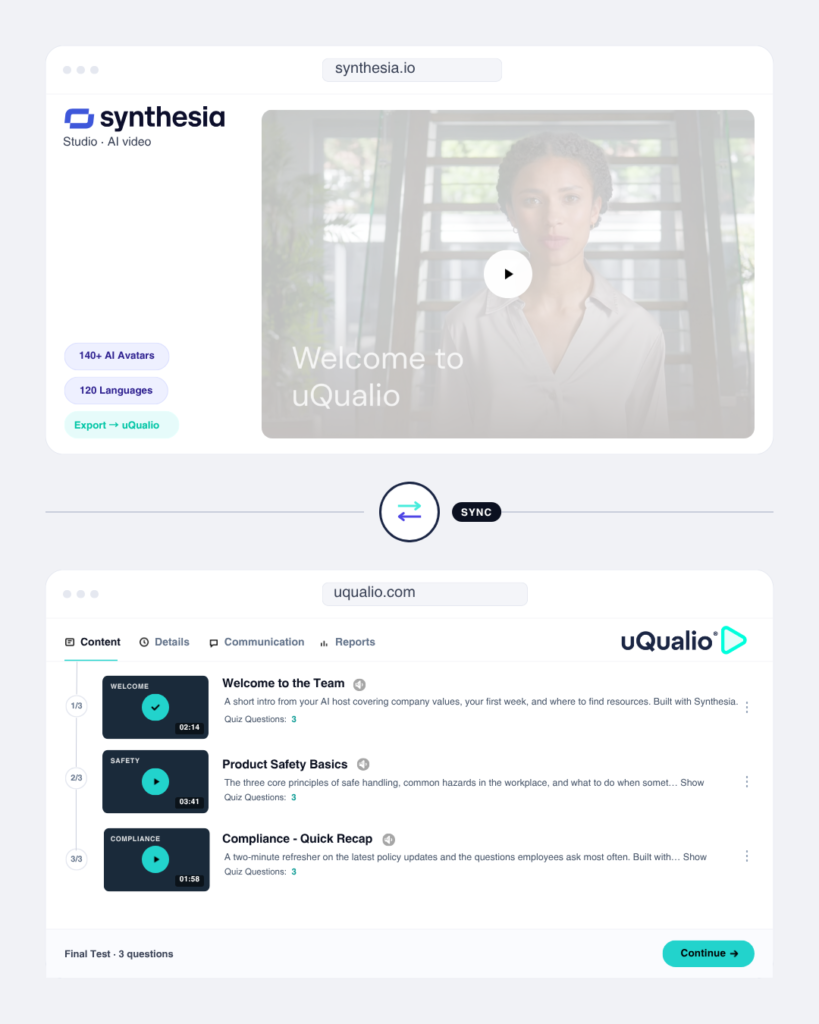
When creating courses, you now have access to Synthesia videos automatically, Just select them, then add quizzes, structure lessons, and build a full course in minutes.
Step 03
Launch and track at any scale
Deploy to your whole organization — or a single team — via a branded learning portal. Track completion, quiz scores, and engagement in real time.
faster course creation
supported languages
completion tracking
re-uploads needed
The integration advantage
Easy access to updated videos with a click...
Update a video in Synthesia and with one-time simple integration, you can easily select in uQualio to keep your courses updated. No scrambling to find videos.
- The Synthesia button in uQualio shows your available videos — just click what you want
- Add interactive quizzes and knowledge checks on top of any video
- Track who has watched, who passed, and who needs a nudge
- Issue certificates upon completion — fully branded to your company
- Works with your existing SSO, HRIS, and team structure
Why it matters
Built for teams who don't have time to waste
Synthesia makes great videos easy. uQualio makes those videos into learning that actually sticks.
Use cases
What teams are building with this Synthesia + Video LMS integration
Onboarding
New hire onboarding at scale
Build a complete onboarding program using Synthesia avatars for welcome messages, company culture, and tool walkthroughs. New starters complete it on day one — tracked automatically.
reduction in HR onboarding time
Compliance
Annual compliance training
Replace dry PDFs and in-person sessions with engaging AI-generated videos on GDPR, data security, or health & safety. Certify every employee and export audit-ready reports.
completion rates vs 54% with static docs
Sales enablement
Product and sales training
Use Synthesia to produce product demo videos and pitch training.
Wrap them in a uQualio course with quizzes to ensure reps are certified before they take a single call.
faster sales ramp time
Get started
Ready to turn your Synthesia videos into courses that scale?
Connect your Synthesia workspace to uQualio’s AI video course creator in minutes. Free no-risk trial.
Quick Answers to Common Questions!
- What is Synthesia?
Synthesia is a platform that uses artificial intelligence to create videos. With Synthesia, you can make professional-looking videos using AI characters and voices, without needing any special equipment. It’s perfect for anyone who needs to create video content quickly and easily, whether for marketing, education, or other purposes.
- Why Use This Synthesia LMS Integration?
By connecting your Synthesia account with uQualio, you can easily turn your AI-generated videos into interactive learning courses. This means you can add quizzes, track how well learners are doing, and get feedback—all within one platform.
- Why Choose Synthesia with uQualio?
This integration makes it easy to create videos with Synthesia’s AI video creation and then combine them with uQualio’s next-generation tools to turn the video into interactive learning courses. It’s great for educators, trainers, and marketers who want to make their videos more engaging and effective. Plus, you can see how learners interact with your content and make improvements based on that data.
- How to Use Synthesia with uQualio
Getting started is easy. Just connect your Synthesia account to uQualio, and you can start turning your AI-generated videos into learning courses right from your uQualio dashboard.
- Create Courses from Videos: Select the videos you’ve made with Synthesia and quickly set up courses on uQualio. You can add quizzes and other interactive features to make the learning experience more engaging.
- Personalize Learning: Use Synthesia’s AI characters to create videos that speak directly to your audience. This integration helps you deliver personalized training to your learners, making your courses more interesting and relevant.
- Engage Learners: Keep learners involved by adding quizzes and feedback options to your videos. With uQualio’s tools, learners can easily go back and review specific parts of the video to reinforce what they’ve learned.
- Track Progress: See who is watching your videos and how they’re doing in the course. uQualio’s tracking tools help you understand where learners might need more help.
- Improve Training: Use the information you gather to make your courses even better. Whether it’s updating quiz questions or changing the video content, the Synthesia and uQualio integration helps you keep your training materials effective and up to date.
- How to Get Started with uQualio's Synthesia LMS Integration
Learn how easy it is to integrate the Synthesia and uQualio platforms here in the video course.
Disclaimer: Synthesia – AI-generated videos
All partners listed on our website are independent legal entities. Any agreement regarding services is solely between you and the partner, including costs and terms. uQualio is not responsible for its services and is not involved in any disputes between you and a partner.