
Flexible Integration Solutions
Fit uQualio into your tech stack: 4 ways, no lock-in
Start with a shared link and no integration at all. Embed a course inside your product with an iFrame. Pipe completion data back to your CRM via REST API. Or run uQualio headless with your own UI on the front. The mode you choose depends on how much integration you need, and you can change it as you grow.
No code · No hassle · Plans from $19.99/month

Four ways to deploy uQualio
Most teams start standalone and add integration as the need arises. None of these modes require you to migrate your content — switching modes is a configuration change, not a rebuild.
Flexible Integration Solutions
If you want onboarding completion to trigger something in your billing or operations system
The REST API handles that. Completion comes back as a webhook. Your operations team connects the dots: course finished → customer marked active → invoice triggered → account unlocked. No manual check. No support queue backlog from customers who skipped setup.

SecureFirst integrates its cybersecurity system with uQualio through API, to ensure a seamless experience for their customers
Four ways to deploy uQualio
Most teams start standalone and add integration as the need arises. None of these modes requires you to migrate your content, so switching modes is a configuration change, not a rebuild.
Standalone:
A link you can send today
Use uQualio as a complete, independent learning platform. No integration required. Sign up, add your branding, build your first course, and share the link. Every feature incl. quizzes, certificates, completion tracking, automated reminders, and multi-language (add-on), works out of the box.
Applied Information embeds a standalone platform as a Help button within its Glance traffic management system.
Best for: teams getting started, external partner or customer training where learners expect to follow a link, and any use case where your tech stack doesn’t need to know what’s happening in the training platform.
Included on all plans.
iFrame Embed Solution:
Training lives inside your product
Embed a uQualio channel or individual course directly inside any website or app using an iFrame. Learners stay on your page. No redirect, no separate tab, no separate login prompt. The course expands inline from a thumbnail.
Best for: customer onboarding embedded in your product UI, support articles with training attached, and product pages where you want the training contextual to the content.
SecureFirst uses this to deliver compliance training inside its own cybersecurity platform. They use uQualio for customers to complete training without knowing it runs on uQualio.
Included on all plans.
REST API + SSO Solution:
Completion data flows to your systems
Full programmatic integration: user synchronisation, automated enrolment, single sign-on, and completion data returned to your CRM, billing system, or operations platform via webhook. When a learner completes a course, your system knows. That event can trigger an invoice, update a CRM record, advance a customer through an onboarding workflow, or mark a certification as current in your HR system. You define what happens with the data. uQualio sends it.
Best for: SaaS companies that want onboarding completion to connect to billing or activation; partner networks where CRM records need to reflect certification status; HR-driven compliance programmes where the source of truth is not the LMS.
REST API is available as an add-on.
Headless Solution:
Your UI, uQualio, as the backend
Build your own custom front-end while uQualio handles content delivery, tracking, and reporting in the background. Maximum brand control and learners interact with an interface you designed; uQualio is invisible.
Best for: SaaS companies embedding training as a native feature of their product, enterprise deployments with strict UI requirements, and gig-worker or marketplace platforms that need training to feel part of the product rather than bolted on.
Headless available as a add-on.
Comparison
Which mode is right for your use case?
| Capability | Standalone | iFrame Embed | REST API | Headless |
|---|---|---|---|---|
| Setup time | ⚡ Minutes | ⚡ Minutes | ⏱ Hours | ⚡ Minutes |
| No developer needed | ✅ | ✅ | ❌ | ✅ |
| Learners stay on your site | ❌ | ✅ | ✅ | ✅ |
| SSO / user sync | ❌ | ❌ | ✅ | ❌ |
| Custom front-end UI | ❌ | ❌ | Limited | ✅ Full |
| Automated enrolments | Manual | Manual | ✅ API | ✅ API |
| Pricing | ✅ Included | ✅ Included | Add-on | Add-on |
| Best for | Teams wanting a ready-to-use LMS fast | Embedding training in existing sites | Enterprise tech stack integration | SaaS products & custom builds |
Integration Partners
Software & Platforms uQualio integrates with
All integrations are live in the admin panel. No marketplace install, no developer required for most.
- All
- AI video
- eCommerce
- HR systems
- Images
- Video Platform
- Webinar & Live
 Elai.io is a platform that offers AI-powered solutions for creating engaging online video content. Elai.io’s user-friendly interface and customizable options make it accessible and efficient for users.
-
Millions of businesses rely on Stripe’s software and APIs to manage online payments, send payouts, and streamline their business operations. By integrating Stripe with uQualio, you can set up your own Stripe payments account to sell courses and receive payments directly into your account.
-
Hybrid online meetings that just work. Whereby’s co-location groups give your distributed team hybrid meetings that feel like you’re all in the same room. Seamlessly embed your Whereby platform into uQualio to deliver online classroom training.
-
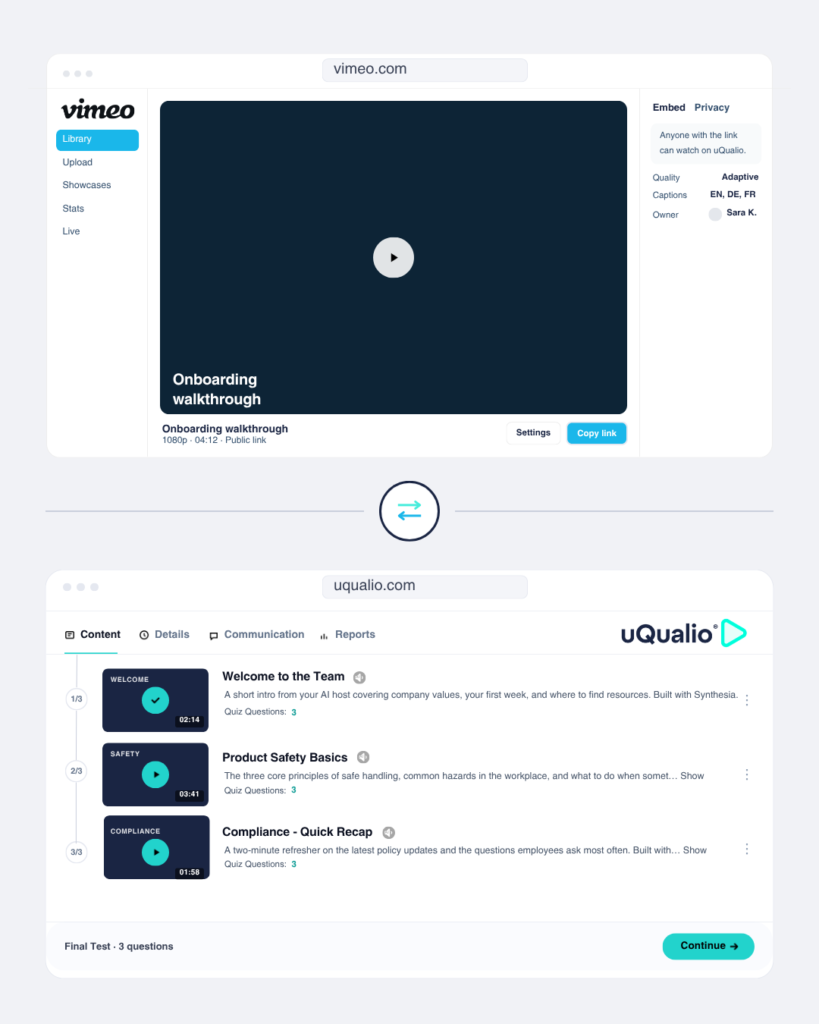
Vimeo is a leading provider to create, edit and share quality video. It was designed to integrate with LMS platforms. When you integrate your uQualio video training platform with Vimeo, you have a powerful combination for making video eLearning courses.
-
Planday is a leading cloud-based workforce management software designed for shift-based businesses to streamline scheduling, time tracking, communication, and payroll. When you integrate your uQualio video training platform with Planday, you can easily manage your employee training details and results for all your staff.
-
Connect YouTube to uQualio and turn any YouTube video into a trackable, ad-free employee training course. Add quizzes, track completions, issue certificates - in minutes. No re-uploading needed.
-
When integrated with uQualio, you can quickly sign up by clicking “Sign up with Google,” which automatically creates an account using your Google profile information, streamlining the registration process and making it easier to get started with creating uQualio courses.
-
Created as a hosting platform that gave customers complete control of their data, TwentyThree have all the tools any company needs to make, manage and share video and webinars. When you integrate your TwentyThree videos with uQualio then they become learning videos too.
-
VIXY Video is a secure and user-friendly video platform professionals use to host, manage, and stream live and on-demand video. With video-led LMS uQualio, you can repurpose your VIXY videos for microlearning courses that are better retained than traditional LMS platforms.
-
Kaltura is a cloud-based platform for quick, interactive video creation and editing. It is a video studio designed especially to integrate with LMS platforms. When you integrate your uQualio video training platform with Kaltura, you have a seamless way to create your video eLearning courses.
-
Unsplash is an online website for free usable images taken by more than 265,000 photographers. Millions of pictures ready for you to use in the training material so you can design your learning courses in the uQualio authoring/course creation template.
-
Colossyan Creator is an AI-powered video tool that simplifies the creation of interactive video content by allowing users to add elements like questions, quizzes, and interactive hotspots without needing technical skills. This tool is especially useful for educators, trainers
-
Synthesia is a video creation tool that enables users to easily create professional-quality videos for online courses, with features like AI-generated avatars and customizable video formats. It’s user-friendly and accessible even to those without video production experience.












Custom integrations
Any platform not listed above is reachable via the REST API. User management, course assignment, completion data, certificate retrieval — most platform functions are covered by the API. If you need data to flow between uQualio and your CRM, HRIS, or operations system, the API is the path.
But don't take our word for it — see what our customers have to say:

Customer Software & Hardware Training + Technical Support
“We wanted a microlearning video LMS platform to train the distribution on how to use and get support for our products, as well as how to sell our products and showcase their features. uQualio turned out to be an excellent choice for both types of training.”

Peter Ashley
VP of Business Development at Applied Information

Integrated eLearning Component of Cybersecurity Awareness
“Using uQualio, SecureFirst helped its customers achieve iron-clad compliance adherence 87% faster, by saving ~200-300 hours in product R&D time.”

Dion Grydell
Founder and CEO of SecureFirst

Get started
Start standalone today. Add integration when you're ready.
The fastest path is a 14-day free trial on the standalone plan. No integration, no developer, no IT project. Build your first course, share the link, and see the completion dashboard before your trial ends.
4 deployment modes
Integrate your video training LMS solution
The White-label deployment works across four modes: standalone platform on your own sub-domain, iFrame embed inside your product or website, REST API integration, and headless integration.

Standalone Platform
Use uQualio as your complete, independent white label learning platform. No integration required. Sign up, brand it, build your courses, and share. Ready on Day 1 with all features.
- Custom domain and full branding
- Learner portal fully under your identity
- No development work required
- Live in under 2 hours

iFrame Embed
Embed your uQualio directory, training channel, or a single course directly inside any website or app using an iFrame. Learners never leave your site. Training appears exactly where they need it.
- Embed on product pages, support portals, in apps
- No separate LMS login required for learners
- Improved engagement and reduced drop-off
- Better product adoption with training in context

REST API + SSO
Full programmatic integration with your backend systems. Sync users from your HR platform, automate enrolments from your CRM, enable Single Sign-On, and pull completion data into your BI tools.
- SSO: One set of credentials across systems
- Sync users from HR, CRM, or custom databases
- Automate enrolments from external workflows
- Pull reporting data into Power BI, Tableau
Headless / White-Label API

Maximum control. Build your own custom front-end entirely on your website, embed uQualio headless without any breadcrumb, logo, or other things, so uQualio handles content delivery, tracking, quiz logic, certifications, and analytics behind the scenes.
- Publish content across multiple channels simultaneously
- Ideal for SaaS products and custom enterprise builds
- uQualio infrastructure handles the heavy lifting
Dynamic AI translation
- All text content — subtitles, descriptions, quizzes, objectives – translated dynamically into 40+ languages. One course, every region, no duplication.
AI voice dubbing
- Re-voice videos in different languages using the original speaker’s voice — enabling seamless multilingual training without re-recording.
Common questions about uQualio integrations
- What does uQualio integrate with?
uQualio integrates with 12+ named platforms across AI video creation (Synthesia, Colossyan, Elai), video hosting (Vimeo, YouTube, VIXY, Kaltura, TwentyThree), payments (Stripe), live sessions (Whereby), workforce management (Planday), authentication (Google Sign-Up), and images (Unsplash). For any platform not on this list, the REST API covers most uQualio functions. Integrations can also be made available on request.
- Can I embed uQualio inside my own website or product?
Yes. iFrame embedding is included on all plans. You embed a uQualio channel or individual course as an inline element so learners stay on your page without being redirected to a separate platform. For deeper integration where learners should never see a uQualio URL or interface, the headless deployment mode lets you build your own front-end with uQualio running as the backend.
- Does uQualio support SSO?
SSO is available as part of the REST API add-on. Once connected, learners authenticate via your existing system without a separate uQualio login. Contact the team for REST API add-on configuration.
- What is SSO and does uQualio support single sign-on?
We do not support SSO directly. We use the API to implement single sign on.
- Can uQualio integrate with Salesforce or HubSpot?
There is currently no native plug-and-play Salesforce or HubSpot integration. But the Hubspot integration is in progress. However, uQualio’s REST API and webhook system allow completion events to trigger actions in any system that accepts an API call, including pushing completion data into a Salesforce contact record or updating a HubSpot deal stage when a learner finishes a course. This requires a REST API add-on and a developer to configure the integration. The uQualio team can advise on the implementation approach for your specific CRM setup.
- Can completion data trigger events in my CRM or billing system?
Yes. The REST API returns completion events as webhooks. Your engineering team configures what happens on completion, e.g., update a CRM record, trigger an invoice, advance an onboarding workflow, or unlock a product feature. uQualio sends the event; your system handles the downstream action.
- Do I need a developer to integrate uQualio?
It depends on the mode. Standalone and iFrame embedding require no developer, as both are configured in the admin panel in minutes. The REST API requires partial developer involvement to configure the webhook and connect your systems. Headless deployment can also require full front-end development. Most teams start with standalone or iFrame and add API connectivity when the use case requires it.
- Can I use videos already hosted on Vimeo or YouTube?
Yes. uQualio supports embedding from Vimeo, YouTube, and import from VIXY, Kaltura, and TwentyThree. Add the video URL to your course, or press import, and uQualio handles the trackable player, quiz layer, and subtitles on top of the existing hosted video.
- What is the headless deployment option?
Headless means no label, no controls, so users only see the course page, and no bread crumb, so it looks entirely like your course. Learners interact with your UI and they never see uQualio.
You can of course also let your organisation build and control the learner-facing interface, while uQualio runs the content delivery, tracking, quizzes, certificates, and reporting in the background. This is the highest-control option and requires front-end development. It’s suited to SaaS companies embedding training as a native product feature, and to enterprise deployments with strict interface requirements.
- Is there a partner or reseller programme?
Yes. uQualio has an active integration and sales partner ecosystem. Applications are accepted based on customer demand and fit. See the Partner Programme page for details.
- Does uQualio support SCORM or xAPI?
No. uQualio does not import or export SCORM or xAPI packages. uQualio uses its own native video-and-quiz format: you upload video directly (or link from Vimeo, YouTube, Kaltura, or an AI avatar tool), build quizzes in the course builder, and all completion and quiz data is tracked natively. If you are migrating from a SCORM-based system, your existing video files can be uploaded directly to uQualio. The quiz questions would need to be rebuilt using the uQualio quiz builder. For most use cases involving video micro-learning, the native format produces better completion rates than SCORM-packaged content.